MITRE D3FEND Explained

The MIRTE D3FEND Knowledge Graph lists common cybersecurity countermeasures. (Full size photo)

The MIRTE D3FEND Knowledge Graph lists common cybersecurity countermeasures. (Full size photo)

On June 22, 2021, the National Security Agency Cybersecurity division released details of a new project called D3FEND. “D3FEND, a MITRE research project funded by the NSA, improves the #cybersecurity of NSS, DoD, and the DIB by providing defensive countermeasures for common offensive techniques” (NSA Cyber, Twitter).

The MITRE Corporation is a federally funded organization that supports cybersecurity research and development. To better understand this D3FEND release, it is helpful to know about MITRE ATT&CK (Adversarial Tactics, Techniques, and Common Knowledge), which was first developed in 2013. “The MITRE ATT&CK framework is a curated knowledge base and model for cyber adversary behavior, reflecting the various phases of an adversary's attack lifecycle and the platforms they are known to target” (McAfee, 2020). This framework allows individuals and organizations to better understand the tactics and techniques used by malicious attackers, and to better prepare for and defend against those attacks.

The 2021 release of MITRE D3FEND is a major tool that blue teams can use to protect against exploitation. This framework will allow cybersecurity professionals to fill the gaps in their coverage, comparing their current setup to the D3FEND framework. “These initial results show good promise, and we believe our research has demonstrated the feasibility of a countermeasure model built from real-world data sources” (MITRE, 2021).

For more information, check out the technical whitepaper released by MITRE here.

DarkSide Pipeline Ransomware Attack

The Colonial Pipeline delivers 45% of the fuel supply used by the eastern coast of the United States.  Hackers disrupted it in May 2021 using DarkSide RaaS (Ransomware as a Service).

The Colonial Pipeline delivers 45% of the fuel supply used by the eastern coast of the United States. Hackers disrupted it in May 2021 using DarkSide RaaS (Ransomware as a Service).

On May 11, 2021, the Cybersecurity & Infrastructure Security Agency (CISA) published an article describing the DarkSide ransomware attack on the Colonial Pipeline. This pipeline delivers 45% of the fuel supply used by the eastern coast of the United States.

When Colonial learned of the cyber attack, “they proactively disconnected certain OT (operational technology) systems to ensure the systems’ safety” (CISA report). In other words, while only the company’s IT network was hacked, the OT systems were unaffected but still taken offline deliberately by Colonial as a precaution.


What is DarkSide and how did they hack the pipeline?

Social engineering is a common way for attackers to gain access to unauthorized systems.

Social engineering is a common way for attackers to gain access to unauthorized systems.

DarkSide is a hacking group with ties to Russia. They liken themselves to Robin Hood, claiming to steal money from large companies and redistribute it to smaller organizations through charitable donations. “This Robin Hood mentality is more of a PR stunt” according to Jon DiMaggio, chief security strategist for threat intelligence firm Analyst1, interviewed in an article by TechRepublic. "When they made the donations (two donations at $10,000 each), it was reported across cyber news organizations all over the world," DiMaggio said. "It was essentially a $20K marketing cost that got their name out there. All of these guys seem to have big egos, which is why they have press releases and will talk to the media and researchers. So this donation was likely an attempt to increase their visibility."

So how was the attack carried out? “According to open-source reporting, DarkSide actors have previously been observed gaining access through phishing and exploiting remotely accessible accounts and systems and Virtual Desktop Infrastructure (VDI)” (CISA report). A phishing attack is when an attacker pretends to be someone trustworthy and convinces the victim to share login credentials or other vital system information. A VDI is defined as “the hosting of desktop environments on a central server. It is a form of desktop virtualization, as the specific desktop images run within virtual machines (VMs) and are delivered to end clients over a network” (Citrix).

While the exact details of this attack are still under investigation, it is likely that social engineering and unauthorized VDI access were involved at some level.


How to mitigate ransomware attacks

The Colonial Pipeline attack triggered panic, causing long lines and gas shortages across the east coast.

The Colonial Pipeline attack triggered panic, causing long lines and gas shortages across the east coast.

The CISA report lists many steps to take to help prevent ransomware attacks at your organization. Here is an abbreviated version of some of the steps they describe (see the full article for more details):

  • Require multi-factor authentication

  • Enable strong spam filters

  • Implement a user training program

  • Filter network traffic to prohibit malicious IP addresses

  • Update software in a timely manner.

  • Limit access to resources over networks.

  • Set antivirus/antimalware programs to conduct regular scans

  • Implement unauthorized execution prevention by:

    • Disabling macro scripts from Microsoft Office files

    • Implementing application allowlisting

    • Monitor and/or block inbound connections from Tor

    • Deploy signatures to detect and/or block inbound connection from Cobalt Strike servers

  • Implement and ensure robust network segmentation

  • Organize OT assets into logical zones

  • Identify OT and IT network inter-dependencies and develop workarounds or manual controls

  • Regularly test manual controls

  • Implement regular data backup procedures

    • Ensure that backups are regularly tested

    • Store your backups separately

    • Maintain regularly updated “gold images” of critical systems

    • Retain backup hardware

    • Store source code or executables

  • Ensure user and process account access rights are given based on the principles of least privilege and separation of duties.

For more information on how to defend against ransomware attacks, check out this webcast by John Strand, Owner and Security Analyst at Black Hills Information Security. He explains that there are many simple and free/inexpensive measures that companies can take to protect themselves. The content with John starts at the 29:15 mark and is definitely worth investigating.

Thanks for reading!

Study for I.T. Certifications in Five Steps

What can you do today to learn more and get that certification tomorrow? (Photo credit: XPS)

What can you do today to learn more and get that certification tomorrow? (Photo credit: XPS)

There are five main steps to studying for I.T. certifications. Some people don’t use all of these resources and are still able to pass, but it is best to give yourself a wide variety of study materials to help you learn the content as thoroughly as possible. These steps don’t necessarily need to be taken in this particular order, but some combination of all of them should help you succeed. Lets dive right into the concepts:


Step 1: Download the Exam Objectives

Begin by downloading the exam objectives so you know exactly which topics are covered on the test.  (Photo credit: Austin Distel)

Begin by downloading the exam objectives so you know exactly which topics are covered on the test. (Photo credit: Austin Distel)

Once you choose an IT exam to take, you should start by downloading the list of exam objectives. This list shows every concept that will be on the test, so you know what to study (and what NOT to study). Save the objectives either as a PDF in a prominent location on your computer, or better yet: print them out and put them in a binder. You will want to check back into these objectives often to see if you are on track. Some people like to put checkmarks next to each topic that they understand thoroughly, and this can be a good method to visually track your progress.


Step 2: Watch Video Lessons

Video lessons are a great way to be exposed to new material for the first time. (Photo credit: Sergey Zolkin)

Video lessons are a great way to be exposed to new material for the first time. (Photo credit: Sergey Zolkin)

Many people are visual learners; they would much rather watch someone demonstrate a concept than read about it in a textbook. Video lessons are a great way to expose yourself to new material for the first time.

For entry level IT certifications such as A+, Network+, and Security+, one of the best resources for video lessons is Professor Messer. He offers comprehensive playlists of free YouTube videos that completely cover all of the exam topics.

For other certifications, paid options are available through multiple vendors such as Udemy, LinkedIn Learning, and more. Find a highly rated video series that fits your budget and start watching!

Note: “IT bootcamps” are often very expensive, and while they can be immersive, you could gain that same knowledge through independent study (while saving a bunch of cash). But to each their own…


Step 3: Read a Good Textbook

A good textbook can help you dive deeper into each exam topic and really understand the details.  (Photo credit: Sharon McCutcheon)

A good textbook can help you dive deeper into each exam topic and really understand the details. (Photo credit: Sharon McCutcheon)

While videos can be a great way to introduce new topics, reading good books about the exam topics is one of the best ways to get a more thorough understanding of the material. Even if you consider yourself more of a hands-on or visual learner, if you can push yourself to read through an entire textbook on the subject, you will definitely pick up some new knowledge.

Depending on your exam, there are many different textbooks by many different authors. Read reviews and ask around to find the best book for your topic.


Step 4: Get Hands-On Practice

Hands-on practice is the best way to really connect with the material.  (Photo credit: Caspar Camille Rubin)

Hands-on practice is the best way to really connect with the material. (Photo credit: Caspar Camille Rubin)

If you are studying for an IT exam, you will eventually need hands-on experience with the hardware and software covered in the test. Companies such as Practice Labs and Boson offer labs that give you step-by-step walkthroughs, giving you hands-on practical experience from anywhere with an internet connection.

While most software can be downloaded and installed fairly easily, it is important to note that hardware can be virtualized, which can save you money. For example, if you own a PC with Windows but want to get some practice using macOS or a version of Linux, you can download hypervisor software like VirtualBox or VMware to create a simulated, virtualized version of that other operating system right on your Windows desktop.


Step 5: Take Practice Tests

Practice quizzes and tests are how you check your knowledge.  (Photo credit: Green Chameleon)

Practice quizzes and tests are how you check your knowledge. (Photo credit: Green Chameleon)

After you’ve done the work to learn the material, it is important that you take the time to test your knowledge and ensure that you have truly learned the content. Some of the best practice tests are the ones that not only give you the correct answers at the end, but also explain why each right answer is correct, and why each wrong answer is wrong. This turns the testing process into that final piece of the learning cycle, which spins you back up to steps 2-4 for more detailed learning on the questions you get wrong.

As you take practice tests, try to avoid getting discouraged! Any questions that you get wrong are simply opportunities to make corrections and re-learn the material in a new way.


Get Certified!

When you are ready, go pass your test and grab that certification!  (Photo credit: Lewis Keegan)

When you are ready, go pass your test and grab that certification! (Photo credit: Lewis Keegan)

If you scoring above an 85-90% on practice tests, you are most likely ready to attempt the real exam. If you are still below 85%, go back through steps 1-5, determining your areas of weakness and focusing your study on those specific areas. Find the topics that you enjoy the LEAST and work on them in new ways until you actually start to like them!

Once you take the test and get the certification, it’s time to celebrate, relax for a bit, and then make your next plan. Is it time to start applying for jobs? Is it time to go for another certification? Take the momentum from your success and apply it to your next project, and you will be unstoppable.

Thanks for reading! Good luck!

Which I.T. Certifications Should You Get First?

A+, Network+, and Security+ are some of the best entry-level certifications for a career in IT!  (Photo credit: Yu Hai)

A+, Network+, and Security+ are some of the best entry-level certifications for a career in IT! (Photo credit: Yu Hai)

One of the most exciting things about a career in IT is the sheer amount of opportunities for advancement. Depending on your interests, you can find a job doing just about anything with computers. To prove your level of knowledge to potential employers, certifications can be very useful. With so many certifications out there, it can be difficult to know where to start. Here is some information that might help:


CompTIA A+

The A+ certification shows that you understand the fundamentals of IT.

The A+ certification shows that you understand the fundamentals of IT.

Establishing a career in IT often starts by studying for and obtaining the CompTIA A+ certification. “CompTIA A+ certified professionals are proven problem solvers. They support today’s core technologies from security to cloud to data management and more” (CompTIA website). CompTIA lists the objectives for A+ qualified individuals as having the ability to:

  • Demonstrate baseline security skills for IT support professionals

  • Configure device operating systems, including Windows, Mac, Linux, Chrome OS, Android and iOS and administer client-based as well as cloud-based (SaaS) software

  • Troubleshoot and problem solve core service and support challenges while applying best practices for documentation, change management, and scripting

  • Support basic IT infrastructure and networking

  • Configure and support PC, mobile and IoT device hardware

  • Implement basic data backup and recovery methods and apply data storage and management best practices


CompTIA Network+

Network+ is a good foundational certification for any career in IT.

Network+ is a good foundational certification for any career in IT.

“CompTIA Network+ helps develop a career in IT infrastructure covering troubleshooting, configuring, and managing networks” (CompTIA website). Network+ qualified individuals should be able to:

  • Design and implement functional networks

  • Configure, manage, and maintain essential network devices

  • Use devices such as switches and routers to segment network traffic and create resilient networks

  • Identify benefits and drawbacks of existing network configurations

  • Implement network security, standards, and protocols

  • Troubleshoot network problems

  • Support the creation of virtualized networks


CompTIA Security+

Security+ is a great entry-level certification for those who want a career in cybersecurity!

Security+ is a great entry-level certification for those who want a career in cybersecurity!

“CompTIA Security+ is a global certification that validates the baseline skills necessary to perform core security functions and pursue an IT security career” (CompTIA website) CompTIA describes the following objectives for Security+ individuals:

  • Assess the security posture of an enterprise environment and recommend and implement appropriate security solutions

  • Monitor and secure hybrid environments, including cloud, mobile, and IoT

  • Operate with an awareness of applicable laws and policies, including principles of governance, risk, and compliance

  • Identify, analyze, and respond to security events and incidents


“The CompTIA Triad”

Obtaining all three of the above certifications can make you very marketable to prospective employers.

Obtaining all three of the above certifications can make you very marketable to prospective employers.

As far as certifications go, starting with A+, Network+, and Security+ can be a good idea for many individuals. These foundational certifications are known as “The CompTIA Triad,” and along with other things, can help you land that first job in IT. While it is not required to get all three (or even one for some jobs), many employers screen applicants based on whether or not they have one or all of these certifications. The best thing you can do is look for IT jobs in your area that you are interested in, and see for yourself which certifications are the most requested near you.

Once you have chosen the certification(s) you want to earn, it is time to start studying. Good luck!

Should You Update Your iPhone?

Keeping your iPhone updated will help keep you secure. (Photo credit: Sumudo Mohottige)

Keeping your iPhone updated will help keep you secure. (Photo credit: Sumudo Mohottige)

According to a Pew Research study from 2017, “around one-in-ten people report they never install updates to their smartphone’s apps or operating system.”

Security flaws are constantly being discovered on all kinds of devices in today’s connected world, and iPhones are no exception. Keeping devices updated is incredibly important. Here are some of the main reasons to keep your iPhone (and other devices) updated:


Patch Security Exploits

iPhones can be vulnerable to exploits. (Photo credit: Dlanor S)

iPhones can be vulnerable to exploits. (Photo credit: Dlanor S)

It is a common misconception that only Windows PCs can get viruses or other malware. While it’s true that over 78% of all attacks in 2019 were carried out against Windows systems, there are still significant risks to iOS, MacOS, Linux, and other operating systems.

One case of this was the AceDeceiver Trojan, discovered in 2016 on iOS devices in China. This malware was able to install itself on devices by exploiting a flaw in Apple’s DRM protection. Once on a device, it could install other malicious apps without any knowledge of the user.

This is just one example of malware that existed on iOS, and is a reason why users should take security updates seriously.


Limit Tracking

Apple released iOS 14.5 in April 2021, which included a feature to limit tracking by third parties. (Photo credit: Luke Chesser)

Apple released iOS 14.5 in April 2021, which included a feature to limit tracking by third parties. (Photo credit: Luke Chesser)

With the release of iOS 14.5 in April of 2021, Apple introduced a feature called App Tracking Transparency that allows users to request to opt-out of third party tracking. An example of this kind of tracking is when you search for an item in your web browser, and then suddenly start seeing advertisements for similar items in your social media. While some may find this to be a convenient way to get relevant ads, most view it as a breach of privacy.

Users can opt-out of this tracking by going to Settings > Privacy > Tracking and toggling “Allow Apps to Request to Track” off. This will stop apps from sharing advertising data with each other, and it will automatically say “no” to the apps that request to track your data in the future.

Without updating to iOS 14.5, users would not have this option!


New Features

Keep your iPhone updated to take advantage of the latest features.  (Photo credit: Bagus Hernawan)

Keep your iPhone updated to take advantage of the latest features. (Photo credit: Bagus Hernawan)

Hardware is not the only way that manufacturers release new features. Many new features are released as software updates. Just a few examples of new features in iOS 14.5 include:

  • Unlock Your iPhone With Apple Watch When Wearing a Mask

  • AirTags Support

  • Apple Maps Crowdsourcing for Accidents, Hazards, and Speed Checks

  • Dual-SIM 5G Support

  • New Emoji Characters

  • Expanded Game Controller Support


Conclusion

Yes, users should keep iOS devices updated. The added security, privacy, and access to new features are compelling reasons to take these updates seriously.

Thanks for reading!

How to Safely Store Bitcoin

Keep your cryptocurrencies safe and secure! (Photo credit: André François McKenzie)

Keep your cryptocurrencies safe and secure! (Photo credit: André François McKenzie)

The rise of Bitcoin and other crypto has created more reasons for owners to understand proper security of these currencies. Users can lose money due to hardware failure, loss of keys, and theft. Here are some of the best ways to store cryptocurrencies such as Bitcoin:


Hot Wallet

A “hot wallet” is internet-connected, making it more convenient but also more vulnerable. (Photo credit: Dmitry Demidko)

A “hot wallet” is internet-connected, making it more convenient but also more vulnerable. (Photo credit: Dmitry Demidko)

A “hot wallet” is the easiest way to store cryptocurrencies. Similar to a checking account, a hot wallet is a fast way to access and transfer funds. One important consideration is that hot wallets, also know as exchange wallets, are not insured by the FDIC or any other entity. In other words, if that organization was to be hacked and your coins were stolen, there would be nothing to bail you out. While a hot wallet is useful for making exchanges, it should not be used for holding large amounts of cryptocurrencies. Instead, those larger amounts should be transferred to the next option:


Cold Wallet

A “cold wallet” is safer because it is stored offline. (Photo credit: Erin McKenna)

A “cold wallet” is safer because it is stored offline. (Photo credit: Erin McKenna)

A “cold wallet” is the safest way to store Bitcoin and other digital currencies. Also known as hardware wallets, these wallets are stored offline and are therefore less susceptible to hacking. One of the safest ways to store an offline wallet is by printing it off and making a “paper wallet.” This includes a public and private key that can be used to verify your identity and access the coins. Another way to store a wallet offline is by using a USB drive to hold the public and private keys. The risk in this situation would be the loss or damage to these physical devices/paper.


Physical Coins

Physical coins are another popular way to store Bitcoin. (Photo credit: Dmitry Demidko)

Physical coins are another popular way to store Bitcoin. (Photo credit: Dmitry Demidko)

There are premium services available that will create and ship physical coins to you, with a tamper-proof sticker that indicate the value of the coin. This is more expensive that the free methods mentioned above, but it represents a unique way to hold a digital currency.


Other Considerations

Bitcoin Considerations.jpg

Here are some other things to consider when storing digital currencies:

  • Keep your wallet backed up to protect yourself from hardware failures. Store the backup separately from the computer with a good password.

  • Keep your Bitcoin/crypto software updated to keep it secure.

  • Consider using multiple signatures for transactions to increase security from theft.

  • Read as much as you can about the topic. Search for articles and learn about the currency you are investing in and how to keep it safe!

Thanks for reading!

How to Secure a Raspberry Pi

A Raspberry Pi can be a fun and powerful tool! (Photo credit: Harrison Broadbent)

A Raspberry Pi can be a fun and powerful tool! (Photo credit: Harrison Broadbent)

A Raspberry Pi is a tiny, inexpensive computer. It is a great tool for everyday computing tasks, learning how to code, and even retro gaming. As hardware like this becomes more popular and inexpensive, it is that much more important to understand how to secure these devices from attackers. To secure your device, check out the following steps!


Change the DefaUlt Password

Change the default password on all of your devices! (Photo credit: Amazee Labs)

Change the default password on all of your devices! (Photo credit: Amazee Labs)

One of the first steps you should take to secure your Raspberry Pi is to change the default password. These settings can be changed from the “raspi-config” application, or by typing “sudo raspi-config” from the command line. An even faster way to change this password would be to just type “passwd” into the command line, which will then prompt you to type in a new password.

This is an incredibly important step you should take on any new device, including routers, computers, smart devices, and anything else with an internet connection. To leave the default password unchanged is to invite attackers into your system freely.


Set Up a New User Account

Avoid using the default username when possible (Photo credit: Aryan Dhiman)

Avoid using the default username when possible (Photo credit: Aryan Dhiman)

Everyone that knows about the Raspberry Pi knows that the default username is “pi.” That in itself is a good reason to use a different username. To add a new user named “ryan,” simply type “sudo adduser ryan” in the command line. You can then go through the process of deleting the “pi” user, but it is important to note that some applications require the “pi” user to be present. If you have determined that you are ready to delete the “pi” user, you can read more about that topic in the official documentation here; just make sure you save any data from the “pi” user directory that you might need later!


Require a Password for “SUDO”

The “sudo” command stands for “superuser do.” (Photo credit: Joan Gamell)

The “sudo” command stands for “superuser do.” (Photo credit: Joan Gamell)

The “sudo” command is what allows Raspberry Pi users to act as a “superuser,” giving them elevated privileges with the ability to modify important system files. Unfortunately, the sudo command does not require a password by default, leaving your device vulnerable to attackers!

To force “sudo” to require a password, type “sudo visudo /etc/sudoers.d/010_pi-nopasswd” and change the “pi” entry (or whichever usernames have superuser rights) to: “pi ALL=(ALL) PASSWD: ALL” and save the file. For more details, check out the documentation.


Download the Latest Updates

Keep your system updated to stay secure!  (Photo credit: Vishnu Mohanan)

Keep your system updated to stay secure! (Photo credit: Vishnu Mohanan)

Keeping your Raspberry Pi updated is a fast and easy way to increase security. As vulnerabilities are discovered in software, developers release updates to protect against those weaknesses.

To update your Raspberry Pi, simply type “sudo apt update” in the command line and press enter. This updates your system’s package list. Then, type “sudo apt full-upgrade” which upgrades your software to the latest version. That’s it!

For more details, read the manual here regarding system updates. For more ways to secure your Raspberry Pi, check out the official documentation here. Thanks for reading!

Introduction to RangeForce

The RangeForce logo

The RangeForce logo

RangeForce describes itself as “the world’s most comprehensive cybersecurity training and cyber skills assessment program.” They use virtual machines and step-by-step training to guide you through practice labs on introductory topics such as VIM, regex, and Docker, as well as advanced topics like password cracking and packet capture forensics. With over 20 modules covering various topics, there is a lot of material available for learners of any experience level. Best of all, the training is provided at no cost through the Free Community Edition. Here is a quick walkthrough to get you started:


Create an Account

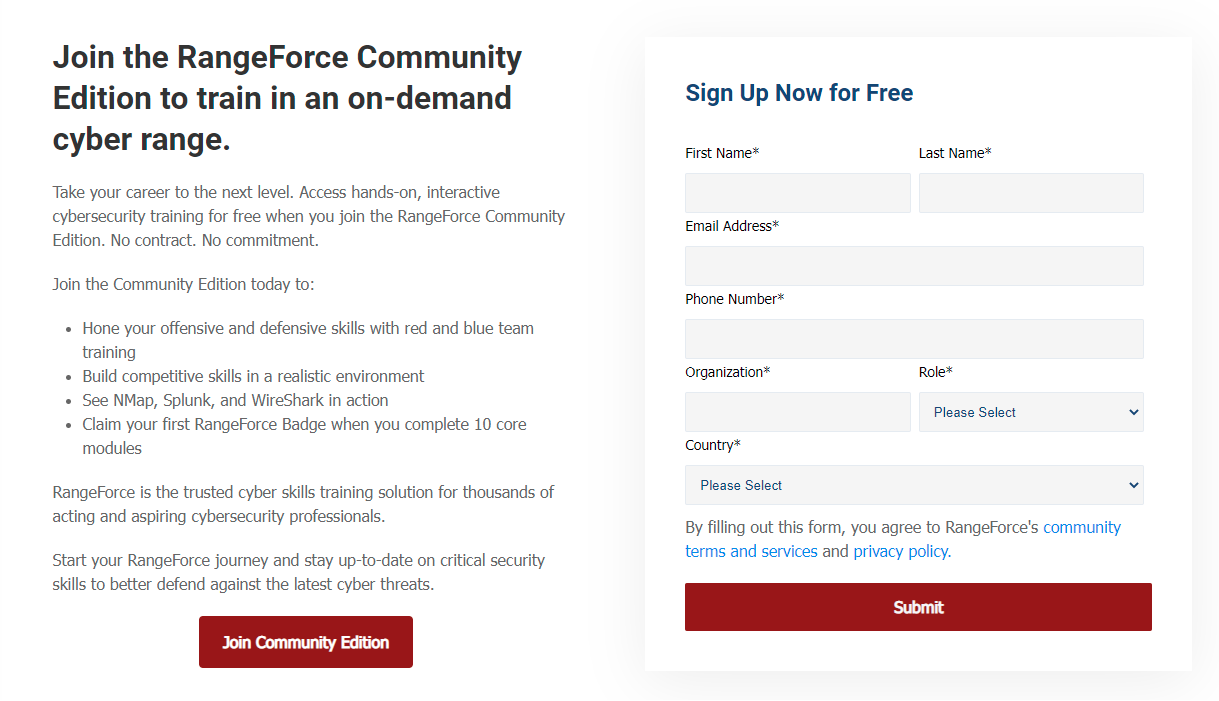
The account sign-up page for RangeForce Free Community Edition

The account sign-up page for RangeForce Free Community Edition

The account sign-up process is simple but might take some time. Fill out the form on the RangeForce website and click submit. You will then receive an email notifying you that it could take up to two business days to receive access to an account because each registration is processed individually. You will probably receive account access within 12-24 hours. You will then need to verify your email address and finish the setup process.


Check Out the Dashboard

The RangeForce dashboard

The RangeForce dashboard

Once you have finished creating your account, you will be greeted with the RangeForce dashboard. This hub shows your current rank on the leaderboard, how many modules you have completed, and the progress of your individually set goals.

Your position on the leaderboard automatically updates as you complete each module. At the time of this writing, you can put yourself in the top 100 members by completing only 13 out of the 21 available modules!

The modules cover a wide variety of topics, including Linux execution content, Splunk, cloud security, and Metasploit. Each category lists a difficulty level of foundational, intermediate, or advanced. Try one of the foundational modules to get an idea of how the courses work.

Individual goals can be set and measured by time spent or modules completed each month or week. As you accomplish the goals you set, this section will update automatically to track your progress and reward you when you finish.


Do the Work!

A few of the available modules

A few of the available modules

The next step is to set a goal and start working on the modules! Each module includes hints and solutions if you need them. Comment below with your current goal and ranking on RangeForce!