What is Buffer Overflow?

A buffer overflow can allow hackers to access your system in unexpected ways.  (Photo credit: Lars Kienle)

A buffer overflow can allow hackers to access your system in unexpected ways. (Photo credit: Lars Kienle)

A buffer overflow is an exploit used by a hacker to force a system to perform actions not intended by the programmers. To understand this concept, we first need to understand what a buffer is.

A buffer is a place where data is stored. A common example of this would be a login/password text box on a website. For our purposes, let’s assume that the text box is expecting a password of 12 characters or less. If a malicious hacker can input a formula that the programmer didn’t account for that could result in many more than 12 characters being entered into that text box, those extra characters would spill over into the surrounding memory, causing unintended side effects. This type of exploit can be used by the bad guys to gain access to hidden information on the system which could compromise and even change the operations of that computer/server. Without the proper controls in place, the extra information (overflow) is inserted into the computer memory, causing the computer to blindly run new instructions.

The simplest method for preventing buffer overflows is to use a programming language that does not allow for them. While C allows for buffer overflows, other languages such as Java, Python, and .NET do not require special changes.

Buffer overflows can represent a serious vulnerability to your systems. It is important to check your code for these vulnerabilities and ensure that you are mitigating risk from these types of attacks!

What is Ransomware and Crypto-Malware?

These types of malware could lock you out and cost you big money. (Photo credit: FLY:D)

These types of malware could lock you out and cost you big money. (Photo credit: FLY:D)

Ransomware is a type of malware designed to encrypt a computer, locking the user out of the computer or network completely. The attacker then demands a ransom to restore access to the system. These types of attacks have been carried out against individuals, companies, schools and even hospitals. In 2020, Cybersecurity company BlackFog estimated that “a business is attacked by a cybercriminal every 11 seconds” with a total estimated cost of $20 billion by 2021 (source).

Victims are often required to pay the bad guys in cryptocurrencies such as Bitcoin. “Once they have the Bitcoins, it’s simply a matter of ‘washing’ them via the Dark Web (a process which removes all traces of previous ownership and transactions) and the hackers can then convert the coins to cash” (Eurostaff).

Crypto-malware is similar to ransomware, with the main difference being that crypto-malware locks out the user from personal files but still leaves the operating system functional. The bad guys leave the OS running so that they can present a message to you demanding the ransom payment.

In either case, there are some steps you can take to help prevent these types of attacks:

  • Keep OS, software, and virus protection up to date on the latest version

  • Avoid opening emails or attachments from unknown senders

  • Avoid suspicious websites and links

  • Keep your data backed up routinely on an offline drive

These are just a few ways to keep you safe from ransomware and crypto-malware. It’s up to you to stay informed and stay vigilant!

TryHackMe - What is Splunk?

(Photo credit: Vishnu R Nair)

(Photo credit: Vishnu R Nair)

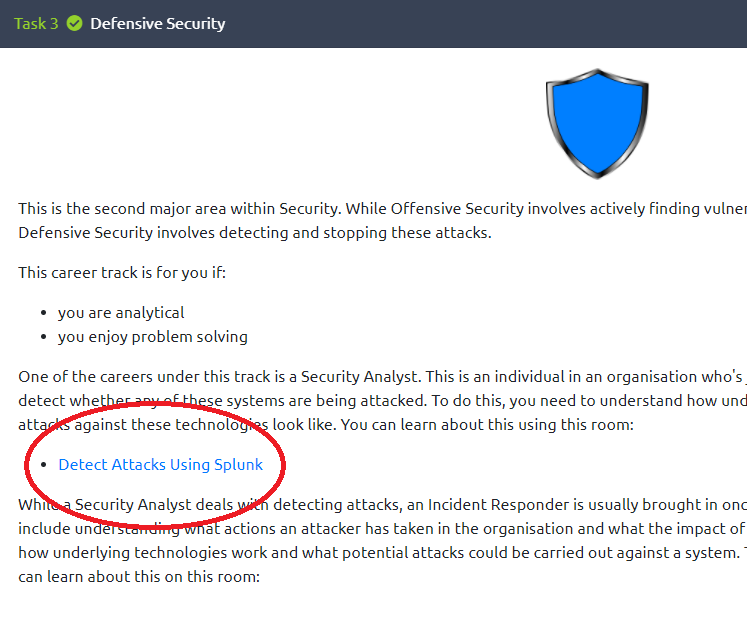
TryHackMe is a great resource for learning basic hacking concepts and getting hands-on experience! This article will show you around the “Detect Attacks Using Splunk” room from TryHackMe. “Splunk” is a product that captures and organizes data into digestible formats to help find patterns and solve problems for companies.

Begin by creating a TryHackMe account and completing the first few click-throughs, which eventually leads to this link:


Once you’ve entered the Splunk “room,” you will need to start your virtual machine. While the machine loads, you will answer some basic questions about Splunk commands. Google is your friend!

Following your quiz is an opportunity to learn about “BOTS,” which is described as a “blue-team jeopardy-esque (CTF) activity.” Learn more about that here.

Eventually, your virtual machine will load. Open the web browser and navigate to the URL listed in the instructions. This should lead you to the first exercise, with a screen that looks like this:

Splunk2.png

Our first task is to track down P01s0n1vy, who is attacking our company, Wayne Enterprises. Follow the prompts to begin to understand which IP address attacked us, and which software was used to carry out the attack. While all of the answers are more or less given to you, it is best to always click the green button to “Run the Search in a New Tab,” which helps you see exactly how Splunk works with data to find the answers.

Splunk3.png

You will then progress through a series of questions. Don’t be discouraged if you need to google some of the answers. The most important thing to remember is that as long as you are learning something, your time is well spent. Everyone starts somewhere, and TryHackMe is a great way to expose yourself to the world of hacking! Keep going and you will keep learning.

(Photo credit: Kaur Kristjan)

(Photo credit: Kaur Kristjan)

Here is a link that provides many answers if you get stuck.

Good luck, and enjoy!

What are DoS and DDoS Attacks?

What is the difference between DoS and DDoS?  (Photo credit: Kevin Ku)

What is the difference between DoS and DDoS? (Photo credit: Kevin Ku)

A “Denial of Service” (DoS) attack involves disrupting a computer or network and making it unavailable to users. This can be accomplished by exploiting a vulnerability in the system. One common DoS method is to flood the network with requests to overload it, which stops legitimate requests from coming through.

A “Distributed Denial of Service” (DDoS) attack is a DoS attack that comes from multiple coordinated sources. This is often achieved by using a botnet, which is a network of private computers maliciously being controlled without consent from the owners. A botnet has strength in numbers and is able to overwhelm a target by abusing protocols such as DNS, ICMP, and Network Time Protocol.

Here are some ways to protect yourself against DoS and DDoS attacks:

  • Use a multi-level defense strategy. This could include Intrusion Prevention and Detection Systems, firewalls, VPNs, content filtering, secure backups, and more depending on the scope of your network.

  • Keep software and firmware updated on all of your network devices. Avoid using hardware that is no longer supported with security updates from the manufacturer.

  • Monitor your network traffic. Understand your baseline so you can recognize anomalies as they occur.

  • Consider implementing cloud-based technologies as a way to outsource DDoS prevention.

Denial of Service attacks normally target business and larger companies, but individuals should also practice good security habits online. This includes using a firewall, keeping your software and OS updated, and not clicking suspicious links or opening strange emails. This will help prevent your system from unknowingly becoming part of a botnet, and will keep you safer online. Stay informed, and stay vigilant!

Is Cybersecurity a Good Career Field?

A career in cybersecurity can be very lucrative. (Photo credit: Max Duzij)

A career in cybersecurity can be very lucrative. (Photo credit: Max Duzij)

There are many possible IT career paths, and cybersecurity can be a great choice for some. If you like problem solving, consider yourself to be a fast learner, and are passionate about defending against cybercrime, than a career in cybersecurity may be right for you. Here are just a few potential jobs in the cybersecurity field:

Entry Level:

  • IT Technician / Help Desk

  • Network Engineer

  • Junior Security Analyst

  • Junior Penetration Tester

  • Systems Administrator

Mid-Level:

  • Security Technician

  • Security Analyst

  • Penetration Tester

  • Incident Responder

Advanced:

  • Cybersecurity Architect

  • Cybersecurity Engineer

  • Chief Information Security Officer

  • Cybersecurity Manager

This list is definitely not exhaustive, and there is some overlap between job titles and what the actual job entails depending on who you speak to. When job searching, it is also worth noting that there is no standard for whether these jobs are called cybersecurity, cyber security, IT security, etc. It is recommended to tailor your resume to fit whatever terminology the current job description is using; this helps you not get filtered out by an automated system looking for keywords that may or may not be on your resume. Again, the job description for that particular listing is your best resource when choosing your words carefully.

How to get started

To get your first job in cybersecurity, start by looking at your current background. Do you already have a degree or work experience in IT? Do you have a degree in an unrelated field? Some jobs are looking for a 4-year degree, and some are not. Certifications are a great first step, whether or not you have a degree. Many professionals recommend the CompTIA Network+ and Security+ as some of the first certifications to get to jumpstart any IT career.

It is also important to get hands on experience. Start using programs like Nmap to see how network connections work. Download a virtual machine and install an operating system that you might be less familiar with, such as a Linux distribution. Volunteer at a local small company to help them with tech support and troubleshooting. Watch some videos about bash scripting or Python and teach yourself some basic coding. Do anything that you can to add relevant skills and experience to your resume!

A degree in IT can help, but it is not required for all jobs. What you know and what you can do is more important than what school you did or didn’t go to. Don’t forget about soft skills: being able to communicate professionally is key to any interview and any successful career.

If you are passionate about technology and willing to do the work to learn the skills you need, a career in cybersecurity can be a great fit. Good luck!

Circuit-Switched vs. Packet-Switched Networking

Packet switching breaks down data into smaller blocks and sends one packet at a time, while circuit switching maintains a connection until all data is sent.  (Photo credit: Markus Spiske)

Packet switching breaks down data into smaller blocks and sends one packet at a time, while circuit switching maintains a connection until all data is sent. (Photo credit: Markus Spiske)

What is the difference between circuit-switched and packet-switched networks? To begin to answer this question, each term needs to be defined.

Circuit switching is defined as a connection between two devices on a network that use a temporary, dedicated communications channel to connect. The first example of this was with with some of the first analog telephone networks. In that case, a continuous circuit was maintained during the duration of the phone call, and the circuit was terminated when the call ended.

Some examples of technologies that use/used circuit switching:

  • POTS - plain old telephone service

  • ISDN - Integrated Services Digital Network

    • BRI - Basic Rate Interface

    • PRI - Primary Rate Interface

Conversely, packet switching is defined as transferring data using smaller packets of data, so the connection between two devices is only used for that packet, and then is freed up for other devices to send packets along the connection. This method is used today to in modern networks limit latency and increase bandwidth efficiency.

Examples of technologies that use packet switching:

  • Frame Relay Networks

  • X.25 Networks

  • ATM - Asynchronous Transfer Mode

  • MPLS - Multiprotocol Label Switching

What is a Rootkit?

Rootkits are nearly invisible and therefore very difficult to remove. (Photo credit: Michael Dziedzic)

Rootkits are nearly invisible and therefore very difficult to remove. (Photo credit: Michael Dziedzic)

The term “rootkit” is derived from the Linux/Unix name for the highest level user, “root.” The root user has administrator access to a system and is therefore able to modify anything within it.

A rootkit is a tool that allows a hacker to covertly gain access to a system. Rootkits are difficult to detect because they modify the kernel of the operating system. The kernel is the very center of the OS and facilitates interactions between the software and hardware. By modifying the kernel and gaining administrative access, a rootkit allows a hacker to install other malware on your system and prevent you from removing it. This could potentially lead to loss of your data, money, and access to your computer.

Rootkits can typically only be removed with very particular rootkit removal software. It is also important to be very careful when choosing rootkit removal software, as sometimes the “bad guys” put fake rootkit removal software out there which actually just adds more malware to your computer.

To prevent rootkits and other malware from getting onto your computer, it is important to take some basic precautions, such as:

  • Keep your operating system, web browser, and other applications up to date.

  • Use virus protection software and routinely scan for malware.

  • Use a firewall and avoid visiting suspicious websites.

  • Avoid opening emails and attachments from unknown recipients.

These are just a few steps anyone can take to help prevent malware from slowing down your system or leaking out critical personal data to attackers. Remember that it only takes one mistake for a hacker to gain access to your hardware/data. Stay informed, and stay vigilant!

What is Malware?

Take active steps to prevent malware from infiltrating your system! (Photo credit: Michael Geiger)

Take active steps to prevent malware from infiltrating your system! (Photo credit: Michael Geiger)

Malware can be described as any software that is doing something bad to your computer. Malware could do something annoying such as cause pop-up ads, something dangerous like collecting keystrokes as you type, or something discreet like force your computer to become part of a “botnet” without you even knowing!

One type of malware is called “crypto-malware,” which encrypts the data on your device, rendering it inaccessible to you. Another example of malware is called “ransomware,” which causes your data to be locked up until you pay a ransom to the hackers that installed the malware. Other types of malware include “Trojan horses,” “Worms,” and many types of viruses.

To help protect your systems against malware, there are several important things you can do:

  • Keep your operating system, web browser, and other applications up to date.

  • Use virus protection software and routinely scan for malware.

  • Use a firewall and avoid visiting suspicious websites.

  • Avoid opening emails and attachments from unknown recipients.

These are just a few steps anyone can take to help prevent malware from slowing down your system or leaking out critical personal data to attackers. Remember that it only takes one mistake for a hacker to gain access to your hardware/data. Stay informed, and stay vigilant!